
Table of contents Show Hide
- The problem: scattered local MCP scripts and unguarded host actions
- Core capabilities
- 1. Embedded Streamable HTTP MCP server
- 2. Single-instance tray daemon
- 3. Human-in-the-loop approval gate
- 4. Toolchain diagnostics and port governance
- Architecture: unidirectional “Keel” boundaries
- Loopback security and approval workflow
- Native Windows 11 desktop polish
The problem: scattered local MCP scripts and unguarded host actions
As daily engineering workflows increasingly rely on AI coding clients like Claude Code CLI and Cursor, managing local Model Context Protocol (MCP) tools often devolves into scattered terminal scripts and ephemeral background processes. Closing a terminal kills the server, port collisions go unnoticed, and destructive host operations—such as terminating processes or cleaning up active ports—lack a reliable desktop confirmation barrier.
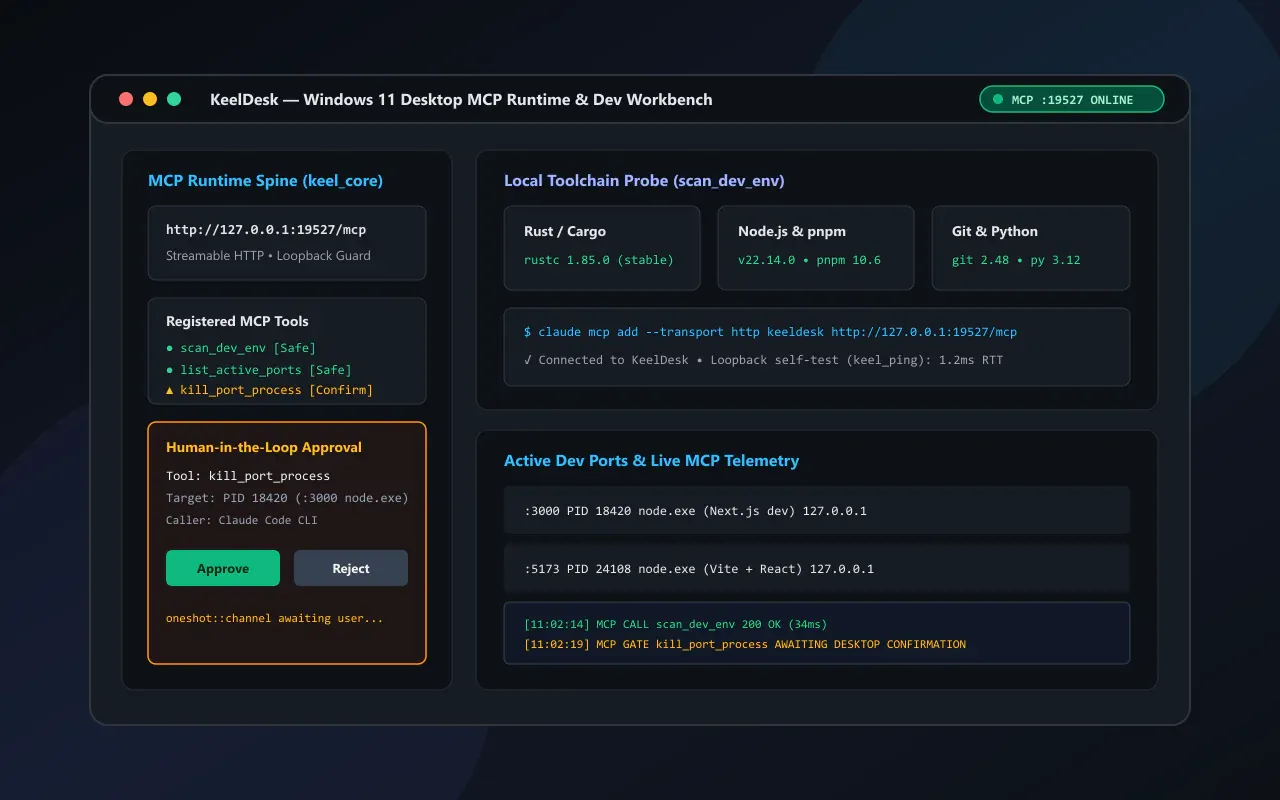
KeelDesk addresses this gap as a Windows 11 desktop MCP runtime spine and local development environment workbench. Built on Tauri v2, Rust, and React, it serves two purposes simultaneously: an everyday developer utility for inspecting local toolchains and governing active TCP ports, and a strictly layered architectural blueprint where the desktop lifecycle, Streamable HTTP MCP server, and human-in-the-loop approval state machine live in a reusable core (keel_core + keel-sdk).
Dual Role: Ready-to-Use Dev Workbench + Desktop MCP Blueprint KeelDesk works out of the box to inspect local toolchains and manage listening ports via UI or MCP, while its strict separation between
keel_coreandworkbenchlets you swap out the business module to build new desktop-hosted MCP servers without rewriting tray, security, or approval plumbing.
Core capabilities
1. Embedded Streamable HTTP MCP server
Powered by Rust rmcp and axum, KeelDesk hosts a native Streamable HTTP MCP endpoint inside the desktop process (http://127.0.0.1:19527/mcp with a /healthz probe, configurable via KEELDESK_MCP_PORT) for zero-friction integration with Claude Code CLI and Cursor.
2. Single-instance tray daemon
Uses tauri-plugin-single-instance to focus the existing window on duplicate launches. Closing the window hides it to the Windows system tray so the MCP server stays online in the background until explicitly exited via Quit.
3. Human-in-the-loop approval gate
Every MCP tool is classified as either Safe (read-only passthrough) or ConfirmRequired (desktop approval required). Destructive calls like terminating a port-holding process suspend execution and prompt the user on the desktop, auto-rejecting on timeout.
4. Toolchain diagnostics and port governance
Concurrently probes local Git, Node.js, pnpm, Rust/Cargo, and Python versions and binary paths, while enumerating active local TCP development ports and PIDs for one-click or AI-assisted cleanup.
Architecture: unidirectional “Keel” boundaries
To keep the runtime infrastructure decoupled from domain logic, KeelDesk enforces a strict unidirectional dependency rule across both Rust and TypeScript: the business layer (src-tauri/src/workbench and src/App.tsx) depends on the runtime spine (src-tauri/src/keel_core and src/keel-sdk), while the spine maintains zero reverse imports to domain types.
Cross-language IPC contracts are generated automatically from Rust structs and Tauri command signatures via tauri-specta (src/bindings.ts), eliminating manual TypeScript payload definitions and drift at compile time.
| Design choice | Value delivered | Security & engineering boundary |
|---|---|---|
| Unidirectional core/domain split | Swap workbench to reuse the entire desktop MCP host spine |
keel_core and keel-sdk have zero reverse imports to domain code |
| Loopback + Host/Origin allowlist | Blocks LAN exposure and browser DNS rebinding probes | Binds strictly to 127.0.0.1 and validates HTTP headers |
Safe vs. ConfirmRequired tiers |
Zero-friction read probes with mandatory human review for mutations | Pending approvals auto-reject on timeout; never fail-open |
Built-in keel_ping self-test |
Verify transport and approval gates without an external AI client | Uses Windows native SChannel TLS (reqwest) for live loopback handshakes |
Loopback security and approval workflow
Exposing host capabilities over an HTTP endpoint requires defense in depth. KeelDesk enforces three layers of protection from socket binding down to process execution:
- Loopback binding & DNS rebinding guard: The embedded
axumserver binds strictly to127.0.0.1and validatesHostandOriginheaders against an explicit loopback allowlist on every request, preventing malicious browser tabs from probing the local MCP server via DNS rebinding. - End-to-end loopback self-test (
keel_ping): Includes a built-in HTTP client backed by Windows native SChannel TLS (reqwest) that dispatches a live loopback handshake andkeel_pingcall against/mcp, plus a built-in dry-run approval drill right from the desktop UI. - Async suspension via
oneshotchannels: When an MCP client invokeskill_port_process(ConfirmRequired),keel_coreparks the in-flight request on atokio::sync::oneshotchannel and surfaces an approval card in the desktop UI. The target process is terminated only if the user explicitly clicks Approve before the timeout expires.
Native Windows 11 desktop polish
- Immersive dark title bar & Snap Layouts: Enables
DWMWA_USE_IMMERSIVE_DARK_MODEvia Win32 DWM APIs while preserving native window frame styles (WS_THICKFRAME | WS_CAPTION | WS_MAXIMIZEBOX) so hovering the maximize button triggers native Windows 11 Snap Layouts. - Two-stage flash-free boot: Starts the window hidden (
visible: false) with an inline dark HTML/CSS skeleton while pre-scanning the environment in the background, revealing the window only when the first frame is ready. 100dvhviewport-bounded layout: Keeps the entire workbench locked to the viewport with zero page-level scrollbars, isolating scrolling strictly to the port table and live MCP telemetry feed.
For quickstart commands, client configuration, and extension guides, visit the KeelDesk GitHub repository.